
I vibe-coded my talk an hour before giving it
A voice note at 11:35, 27 slides on stage at 12:30, a laptop crash in between. Then the agent kept working the next day, in the foreground and in the background.

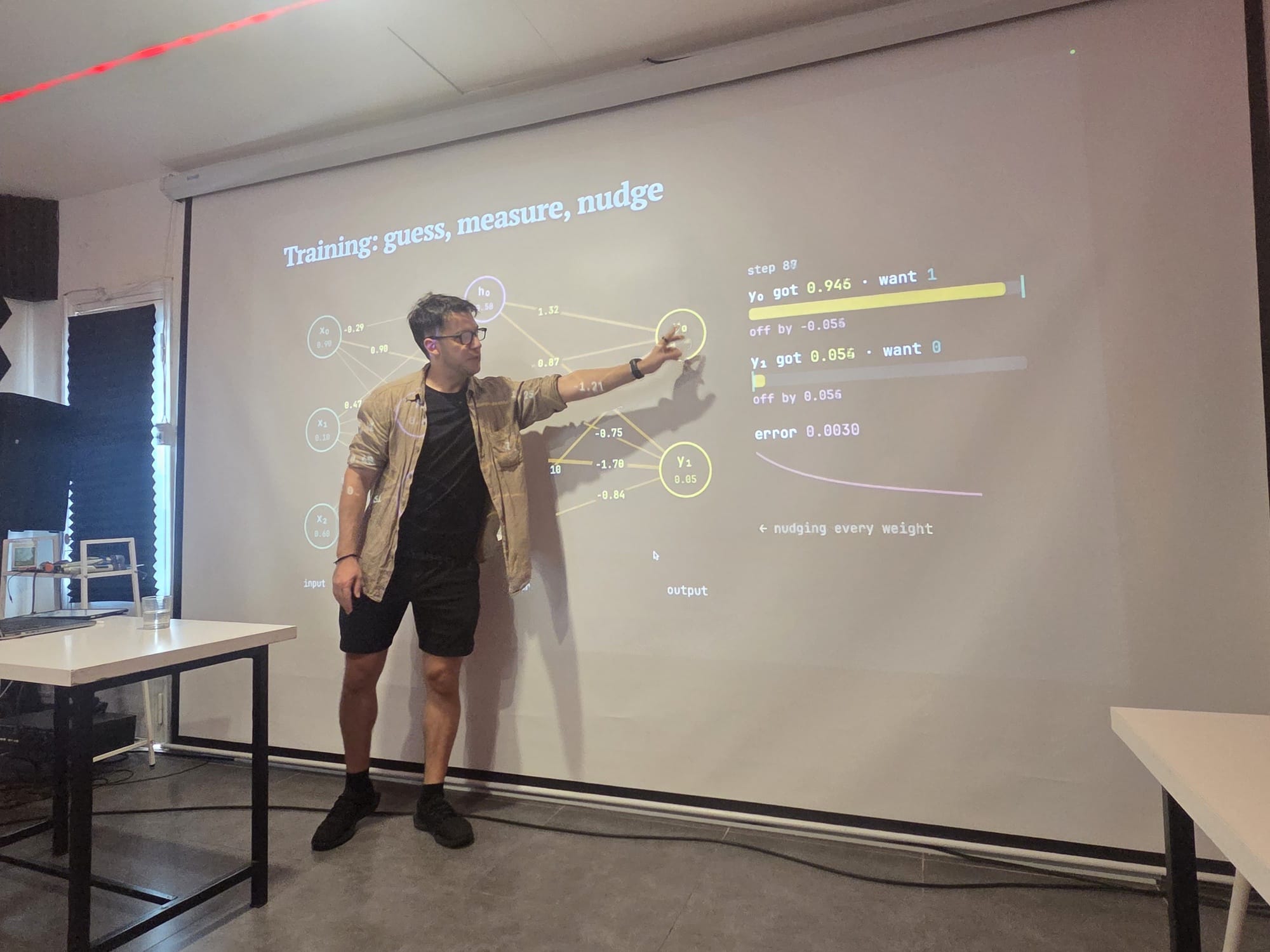
At 11:23 on 3 November I started telling my AI agent that I was presenting at Alex’s AI meetup in an hour and had no slides. I talked for 12 minutes straight. At 12:30 I was on stage with 27 of them.
This is how that went, what broke, and what the agent did the next day without me sitting there. The talk itself is here: How do language models know, remember and reason? They don’t.

The brief was a voice note
I didn’t write a spec. I dictated it: 12 minutes and 11 seconds in one go, about 1,900 words, then another minute of things I forgot. Roughly:
- Three questions: how do language models know things, remember things, reason. The answer to all three: they don’t.
- Open with a black box. Text goes in, a response comes out, and nobody knows what happens in between.
- Show what a model actually is: a tree of company → family → series → model, closed weights next to open weights.
- Show a neural net with the weights labelled, and what you actually download when you download an open model.
- End on “beyond language models”: harnesses, skills, hooks. Then a slide pitching Alex’s company, and one on what I use all this for.
It also had to find Alex’s announcement in my chats and build the slide about his company from what he’d posted there himself.
Here it is, unedited. All 12 minutes of it:
Read the transcript (SuperWhisper, unedited)
I'm giving a presentation in an hour at Alex's AI meetup. I'd like you to make a image as well as presentation and slides. I'm going to be presenting on language models, specifically on Be answering three questions. How do they know things? How do they remember things? And how do they reason? And the joke is: the answer to all of these is they don't, they don't, and they don't. Now, most of this presentation is going to be me with like an iPad just writing things out on a projector, but I also like to have a for a before and an after. For the presentation, I gave this presentation to Yi and Akane a while back. So I think if you check the notes in The tablet and perhaps other places. Note: if you can't, you can't access the tablet right now, it's not connected. But I think we hopefully built a system which backs up all the notes from the tablets automatically on my laptop. If not, we should definitely build that LOL. And the idea is yeah, so let me know what you found historically from the notes. And part of it is kind of like opening the black box. I guess that should also be in the emphasis for little teaser image It's like you've got like some input text, like, hey, Claude, what's the weather today? And Aerova takes that input text into like, I don't know, like a black hole or like alchemaic symbols, like something which looks Esoteric and terrifying almost. Like, yeah, alchemy symbols, um, demonic runes from the Book of Solomon, a black hole, uh, you know, something like that, and you get like an output. saying you know a response. And it would so we're also going to use it to explain how what machine learning actually is and how machine learning solves the problem of creating a computer program that turns input text into output. We're also going to explain how we're going to talk about language models. We're going to generalize this into how it works for different types of models as well, like text to video, image to image text to image etc. Explain how it's just the same fundamental principle. We're also going to start and have a, and this would be part of the actual slides you would make. We would just have a graph, a tree, rather, explaining how, what are language models. So in the top, you would have, for example. Anthropic, and underneath Anthropic, you'd have Claude, and then under Claude, you'd have the leaf nodes of their actual language models, like the different series, like Opus. And Sonnet, for example. And then underneath those, you'd have the actual version. And the actual version is the that's the actual language model. Those are th those are the language models themselves. And we do the same thing for also DeepSeek and OpenAI. And so a combination of like open source and closed source models. And so that one, like one of the slides would be just a sort of a two columns, one showing open source models, one showing closed source models, and at the top of the trees for each of those sections, you would just have like the company that's behind Behind it, and perhaps also include their logo. And then the leaves at the bottom of it are the specific models themselves. This way, they can understand what's a model versus what's the company versus What's a model series? Also, in the end, we should have a section where we explain what it is when you download an open source model. You're actually literally downloading a bunch of ones and zeros. And I think I've got some open source models. And so maybe I can like on my laptop just open it. Like in a I'm not sure if you can open an open source model file in a text file, but showing them what that is. Also, you should have a diagram where it shows like a simplified neural net with all of the variable names. So I forgot exactly what the variable names are, like what you'd use for the weights. I think it's like W00 or something like that, but it should show the nodes. and the weights. We would also go through different samples through different models explaining a neural net or an AI. So the first one is so the the four questions I said I said, so it's how do they know things, how do they remember, how do they reason? There's also a first question before that, which is What is AI? And what is AI? And that slide should just say, what is AI? And I'd ask the audience what they think. And then I would just answer with like bullshit marketing term. Then I would go on to give it a more accurate definition, which is a collection of related technologies which are mostly related to language models and General purpose transformers. But AI is much older than that. You know, we kind of harken back to the 1980s research. We would, you know, harken back a bit to Deep Blue, explain the computational power. Of deep blue and sort of earlier techniques that were done with AI. Then the model, the first iteration of the model is just input mystery box as in just a black box of a question. Mark output. And you know, we put the input in, like, hey, how are you? And it's spit an output app. And that's how most people understand what they call a chat bot, what they call a language model. Then we're going to break it down. We're going to add a tokenizer. In fact, let's say input goes you know, go through a tokenizer, question mark, question, question mark, question mark, goes out into a detokenizer and goes back into a text input. And we have an asterisk under detokenizer because it's not actually a detokenizer. It's actually more complicated. Okay, then that, but we're gonna gloss over it and just call it D toker. We'll just have an Asterisks there. And then we would have ideally a, maybe you could even put it inside the presentation, I don't know, a system where you can type in a sentence and it would like live tokenize it. And it would show you, it would highlight the different parts and give you an output. I think maybe you can embed ChatGPT's tokenizer inside the presentation itself. Because it's a website, that would work pretty well. Then we would have, we would go even further and we would explain how the input vector is effectively multiplied by something to get the output vector. And I would come up with a naive solution. We also explain sort of like the tokenization dictionaries and show how you have a single A single token always a number is equal to always equal to a single token, the same token string, then we would explain, we would come with a naive assumption. And we'll just come up with a model called double. And what double will do is any input token gets multiple in the input vector, gets multiplied by two, and that's the output. Now, obviously, this would produce a bunch of gibberish. And then I would ask the audience as a joke: okay, how would you do it? Right? You know, here's our input vector. How can you come up with a mathematical equation that'll convert the input tokens into output tokens? In a way which is coherent. And then I'd explain it has to work not just for this function, this mathematical function, has to be the same not just for, it has to work and be coherent, not just for this input, but for all inputs. For all inputs, you should have a single function which we're able to provide reasonable output. And then the joke is that no one's going to be able to have an answer for this because it's an insane question. And then the solution would be like, well, no one did. And that's what machine learning came in. And it's the realization that the old model of trying to hand tune these create these equations from scratch is basically impossible. And it's been supplanted by machine learning. And then I would go into supervised training, I think is the term. Explain supervised training, where you have a given input and you have a given output, and you would then use backpropagation. To slightly change the weights, right? So we would go from double to, okay, fine, we need to create a neural net. And then we would explain its layers, and each layer has a bunch of weights. And okay, we take all the input numbers, we multiply them by these weights to go on to the next layer, to multiply them by those weights to go on to the next layer, and then we do that to the output. And we say that's the answer. It's like, okay, that's a more sophisticated model than just doubling everything, and maybe it'll work. But how do you know what the weights are? That's the hard part. And the answer is no one knows what the weights are. Like, at least, I mean, no one solved that answer themselves. It's impossible. And so you would use machine learning with trained supervision and back propagation. And you would just do this over and over. And maybe we can have like a little visual graphic where it can show the delta of how off. An answer is versus the expected response, and then how it backpropagates and makes minute changes in the weights. That would be a really good animation to have. And then after that, we would explain: this is why it needs massive amounts of data. This is why you hear expressions like, you know, language models are eating the internet. Because in order to get enough data, enough training data that you can actually have reasonable weights that are, you know, not too overtuned. you need mass Of enormous amounts of data. That's why they pirated. That's why the companies pirated and stole all this information because they need an incalculable amount in order to train these. These models. And then we can kind of have a little area where we'd be like, okay, and here's how it works for like images, but kind of simplify where it's like, well, images, you know, the input is the ones and zeros in the image And so you explain how you have an image You'd break it down into a pixel, and a pixel has an RGB value, and that is your input vector, effectively. So, can you create a quick summary of what that presentation Would look like. Now, part of it is going to be me with just the whiteboard drawing and sketching things, but a lot of it is like the animations and some of the other stuff I said that should be presentations. You should try to build that.
[Then, a minute later:] And first thing to do from my massive explanation there is make a image and then get to work on the actual presentation. Oh, another thing to add, and basically you should be using like a to-do or whatever you want in order to keep track of all these different minutias I've talked about, is at the end, you also want to have At the end of the presentation, be like, okay, like just one slide that says, okay, and like beyond language models, and have it kind of hint at harnesses and skills and hooks and all that, and then have a sign after that. It's like, well, here's what you do once you get it all to work. And then it can sh you know, it should kind of pitch Alexander's business, I think it's called outfold or something like that. Have like a you know a little animation that explains that. And then also have another slide where it explains Kind of the stuff I've used it for. And just, you know, look through my history, look through all my skills, come up with, you know, some Graphics or whatever that can wow people and explain the art of this. The art of what's possible.
What it built
A Slidev deck (slides written as a web page) with working parts, not pictures of them:
- A live tokenizer. Type a sentence, see the token numbers.
- A toy “model” that just doubles every number, so the audience can watch gibberish come out.
- A small neural net that actually trains on the slide, with the error line falling.
- A photo chopped into a pixel grid, then one pixel shown as its three colour numbers.
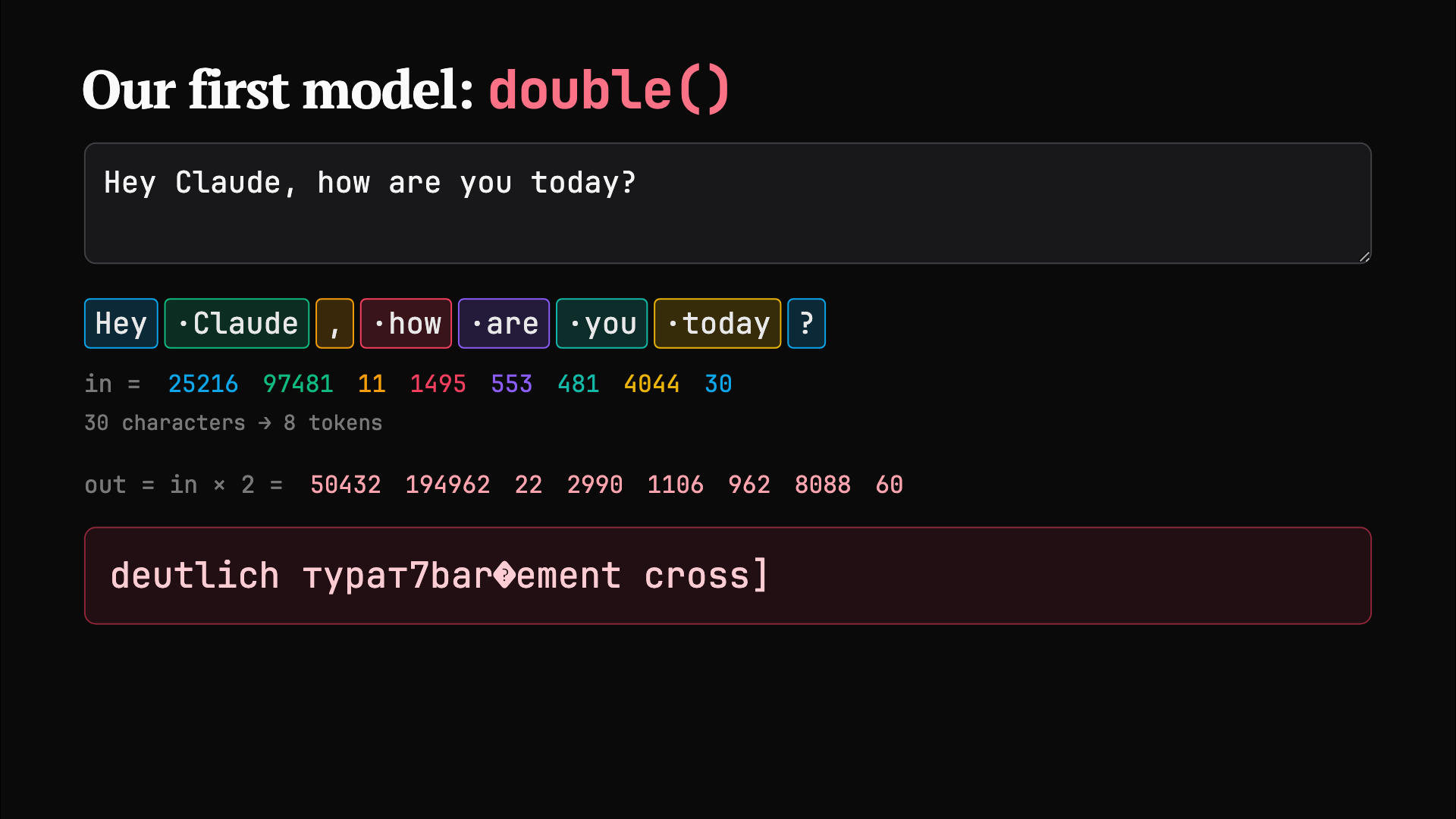
It checked its own work. Every slide was screenshotted at projector resolution and looked at before it said it was done, which caught invisible lines in the neural net and an empty slide that would have blown up live.
Two things went wrong
At 12:00 my laptop crashed. The agent was killed mid-build. When the machine came back I resumed the session, it reread its own transcript, and carried on from where it stopped. Nothing was lost except five minutes.
The second one was my fault. The deck was running from a live dev server, the kind that reloads the page the moment a file changes. That was great at 12:15. At 12:45, with the deck on the projector, the agent was still “fixing” things, and every fix landed on screen in front of the room. I typed:
Stop making prints and changes to the presentation. Now it’s live, you’re making me look bad.
Lesson: once you’re on stage, freeze the deck. Present a built copy, not the thing the agent is editing.
The day after
The next morning I asked for three things in one sentence: save the deck somewhere permanent with version control, write a blog post from it, and check whether Alex had a recording.
- The deck now lives in a
presentationsfolder that commits and pushes itself to a private GitHub repo on every edit. - The agent went through my chats, found the photos Eric and Mikail took of the talk, and noticed Alex hadn’t sent a video.
- I accidentally closed its session halfway through. I asked another session to restart it, then told that session to just take over the work, which it did by reading the first one’s transcript.
- Putting the deck on the blog hit a nasty one: a check ran before the upload finished, Cloudflare cached the 404 for a year, and the URL was dead for good. It moved the deck to a new path and changed the check so it asks the server first and can’t do that again.
- Before handing me the draft it ran a QA pass at four screen sizes and fixed two things: an error the embedded deck threw on load, and the page jumping while photos loaded.
My total input was a few sentences and two taps.
Foreground vs background
The last loose end was the video. Alex might reply in an hour, or in three days. That’s a bad fit for the agent I was talking to, so it handed the wait off.

Foreground is the session I’m working with. It does things now, while I watch, and it stops when I close it. It drafted the post, showed me the message to Alex, and sent it when I said yes.
Background is a watch that outlives the session. The agent filed a card on my always-on server that listens to that one WhatsApp chat. When Alex replies, it wakes a fresh agent with the full context. That agent adds the video to the post and asks me whether to publish. It never messages Alex on its own, and publishing stays my call.
The point is that I don’t babysit waits. A human assistant would say “I’ll keep an eye on it.” This one actually does, and the session that set it up can close.
What I’d tell you to steal
- Dictate the brief. A messy voice note with the joke, the structure and the slides you want beats a careful prompt you never get round to writing.
- Make the agent check its own output by looking at it, not by reading its code.
- Freeze before you present.
- Anything that ends in “wait for someone” belongs in the background, not in a session you have to keep open.