
AImnesia: Making your AI never forget anything again
Your AI has no memory, like Leonard in Memento. Here's how I gave mine tattoos and Polaroids.


In Memento, Leonard can’t make new memories, so he tattoos the important stuff on his body and carries a Polaroid of everyone he meets. That’s your AI. Here’s how I gave mine a memory anyway, and how it finally stopped using em dashes.
In my talk last week I said a language model doesn’t remember anything: every turn, the whole chat gets re-sent from scratch. And if you start a new session, it’s a clean slate from 0.
If you’ve ever told ChatGPT “no em dashes” for the 20th time, you already know this.
My AI is Leonard from Memento
If you haven’t seen Memento, go watch it, it’s great. Leonard can’t form new memories, so every few minutes he starts over. He gets by with a system: the rules that matter are tattooed where he’ll see them, every person he meets gets a Polaroid with a line written on the back, and the case he’s working on is pinned to the wall.
A language model is Leonard. It’s a file of numbers that got set during training and never changes after that. Nothing you say to it gets saved inside it. The only way to make it “remember” is to write things down somewhere and put them back in front of it at the right moment.
That’s all AI memory is. Text pasted into the conversation before your message.
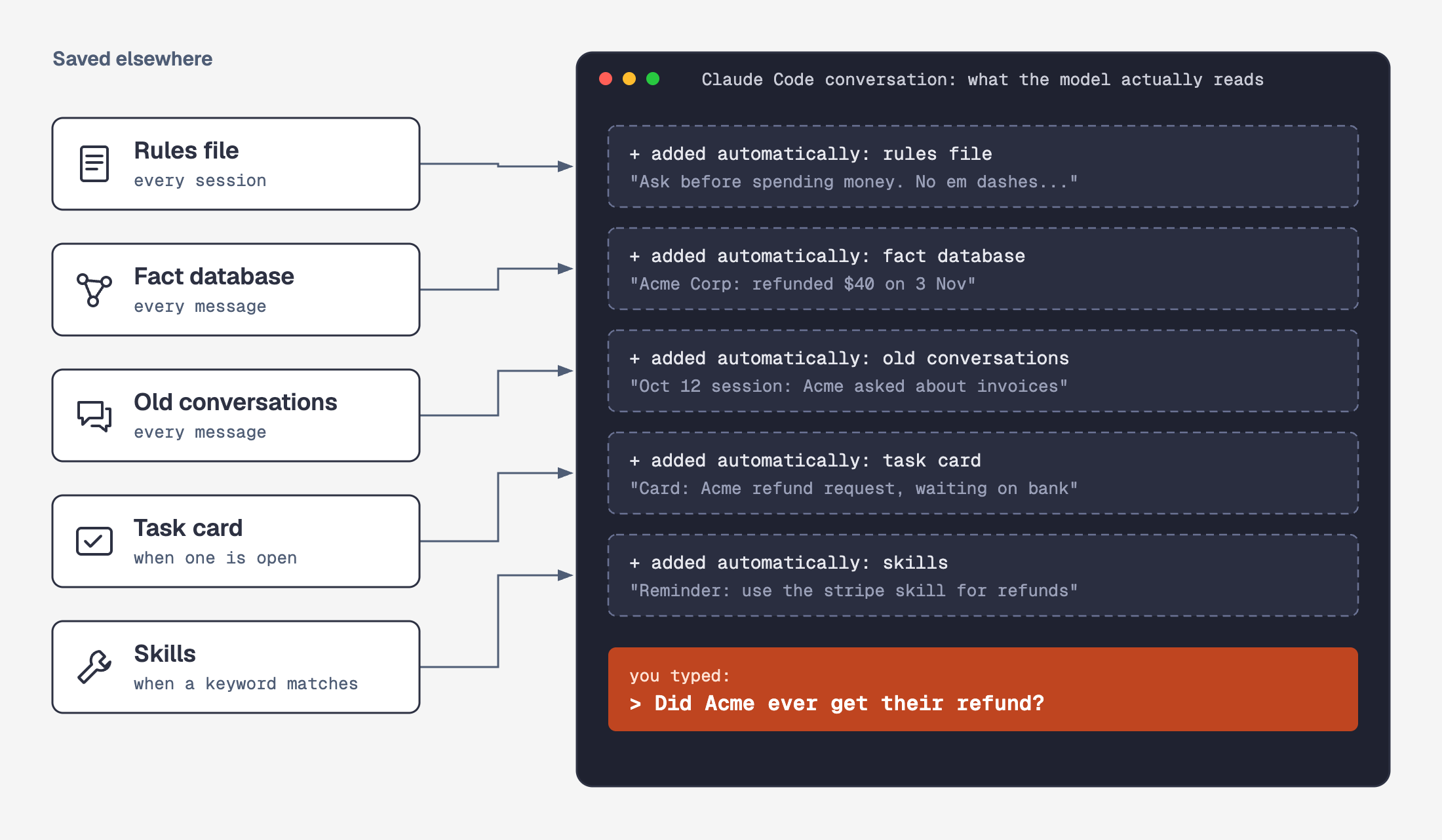
ChatGPT’s memory and Claude’s memory setting do a small version of this. They save a few sentences about you and paste them back in. Nobody reviews them, your teammate doesn’t get them, and you can’t put a procedure in there. Fine for “use metric”. Not fine for running a business on.
I use Claude Code, and this is everything that gets pasted in for me.
Rules it reads every single time
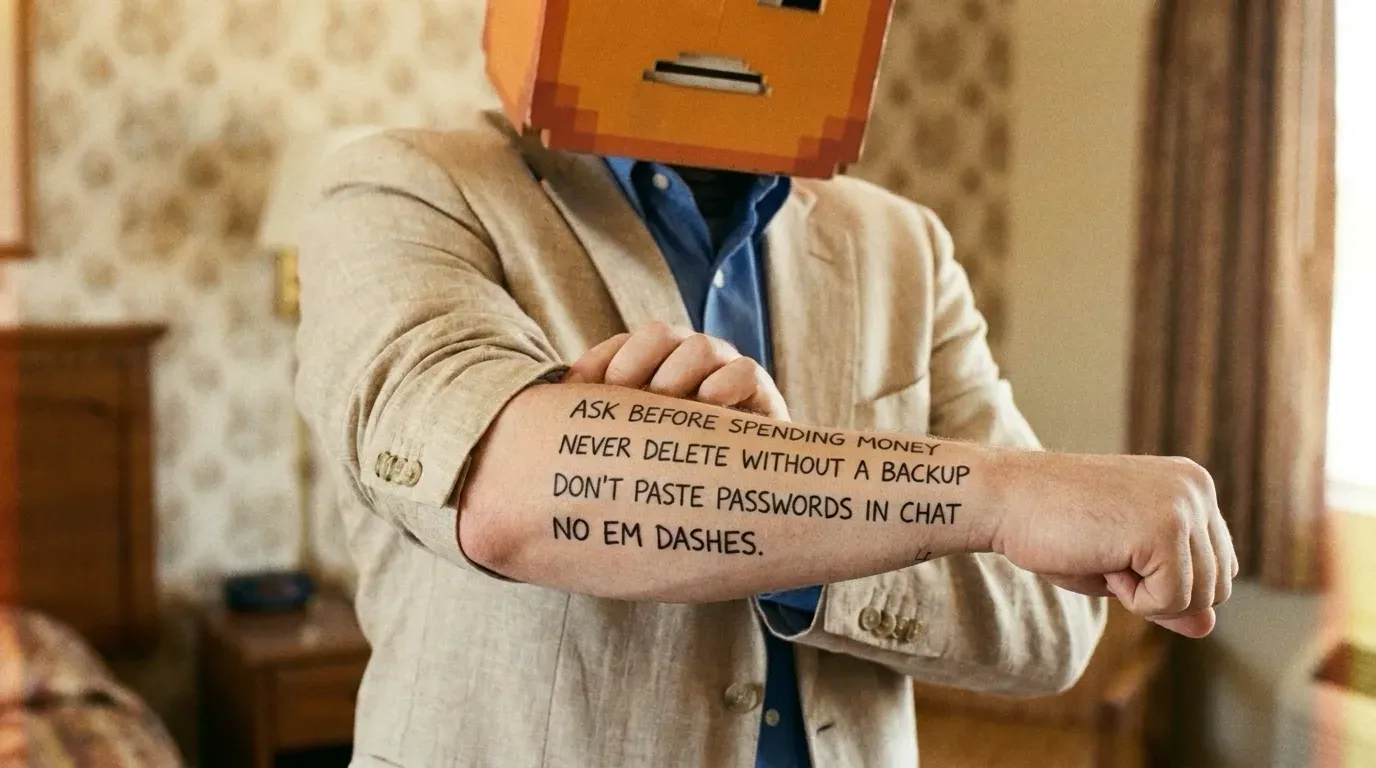
One instructions file that Claude Code reads at the start of every session (it’s called CLAUDE.md).
Mine has things like: ask before spending money, never delete without a backup, never final-submit a payment, units in metric. And no em dashes, which a linter also checks on anything written in my voice, so it can’t just “forget”.
It’s 39 KB and I capped it at 40 KB, because every line gets read on every request. Every new rule has to earn its place.
Skills that show up when you mention them
Rules that apply all the time go in that file. Instructions for one specific job go in a skill instead (more on skills here). Claude Code already lists every skill’s one-line description, but with hundreds of them the agent doesn’t always pick the right one.
There’s a bigger problem too. The rules file sits at the very start of the conversation. As the session goes on, the conversation keeps growing underneath it, and models pay the most attention to what’s recent. A rule read once at the top gets buried, and eventually the agent does the exact thing it was told not to.
So the important stuff gets pasted in again, right when it matters. A small script reads every message I send and checks it against 137 keyword rules (adapted from diet103’s Claude Code showcase). Some keywords I set, most the agents add themselves when they write a new skill. When I mention YouTube, it pastes in “use the youtube-search skill, never web search”. When I mention a password, it pastes in “check 1Password first”. The reminder lands right next to my message, where the model is paying the most attention.
It’s not perfect. While I was writing this post, a message about a screenshot from a movie triggered the YouTube reminder, because “video about” matched. Cheap to ignore, though, and much better than the agent improvising.
Facts it looks up when they come up

Facts go in a fact database. I use Graphiti, an open source knowledge graph by Zep.
How it works: you feed it text (a conversation, a note, an email), and a language model pulls out the things (people, posts, servers, companies) and the facts connecting them. Things become dots, facts become arrows between them. Every arrow gets dates: when it became true, and when it stopped being true.
That last part is the important one. When something changes, the old fact isn’t deleted, it gets an end date. So the agent knows what’s true now and what used to be.
Here’s a real slice of mine, about this blog:
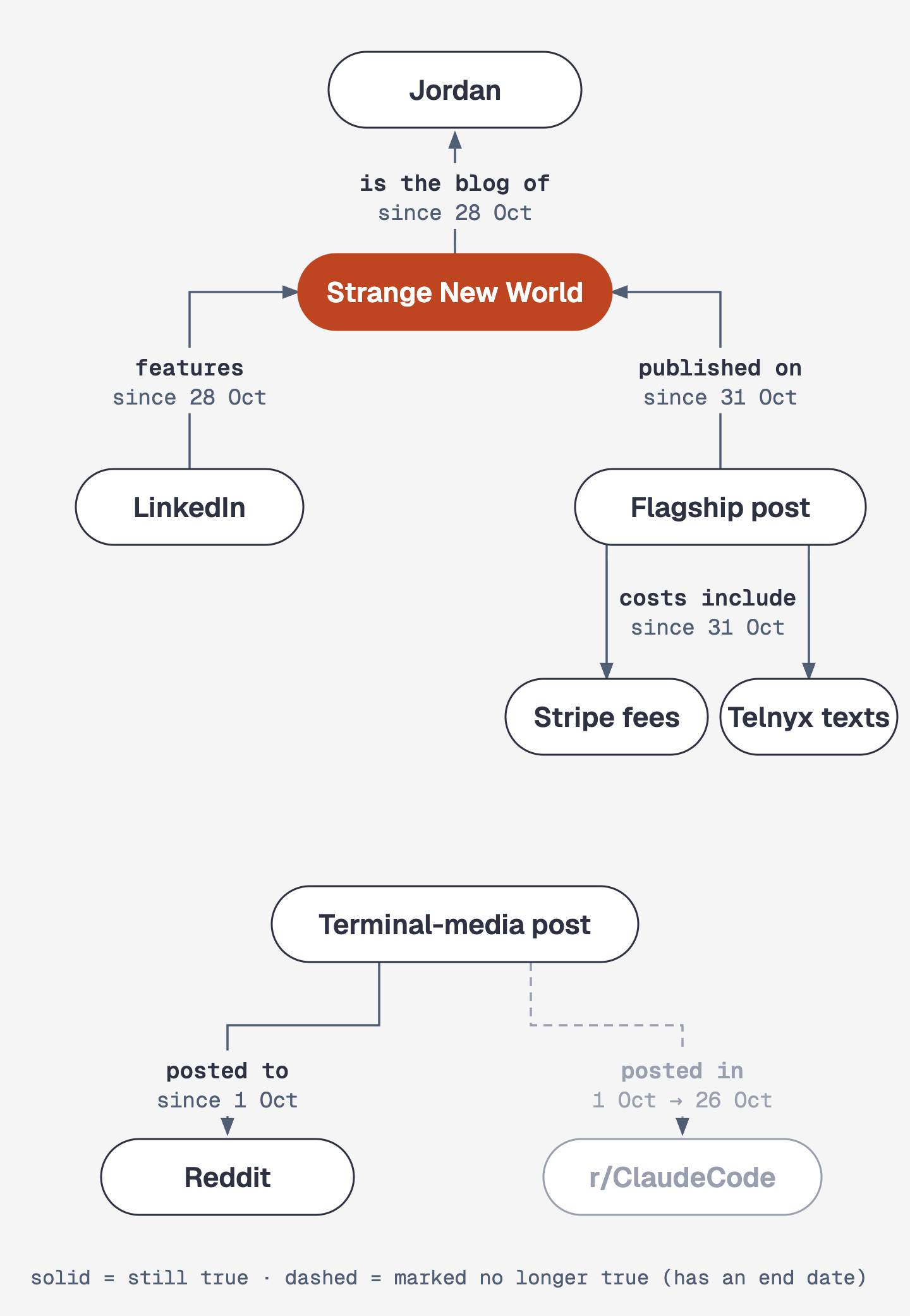
Every time I send a message, a script searches this graph and pastes anything related in above my question. So when I say “the blog”, the agent already knows it’s strangenewworld.net, that my LinkedIn points to it, and which posts went where. I never told it any of that in this session.
Work in progress goes on cards
Anything in progress lives in a task card (I use Linear). The card holds the plan and every result, so when one agent session dies, the next one reads the card and picks up where it stopped.
The code is its own record. If you want to know what actually shipped, read the commit, not a note about the commit.
Passwords never go in memory
Passwords live in 1Password, and the agent pulls one only at the moment it needs it. They never go in the rules file, the fact database or a note.
Every old conversation, searchable
Every session I’ve ever had with it is still on disk: 33,030 of them, 119 GB of text, searchable.
Today I asked it:
Isnt there a prior session/ plan/ agent where we are making a series of blogs for begineers? Isnt the next one in the series supposed to be about memory?
The model had no idea. But it searched my old sessions, found the one where we planned this series, opened the plan file, and answered. That’s this post.
Same question, five places
Say a customer emails support asking about a refund. Here’s where everything comes from:
- Rules file: never refund more than X without asking me.
- Skill: how refunds work in Stripe, pulled in because the message says “refund”.
- Fact database: this customer’s history.
- Task card: the open ticket.
- 1Password: the login for the payment account.
One question, five places, and the agent knows which one to check for what.
Deciding what to write down
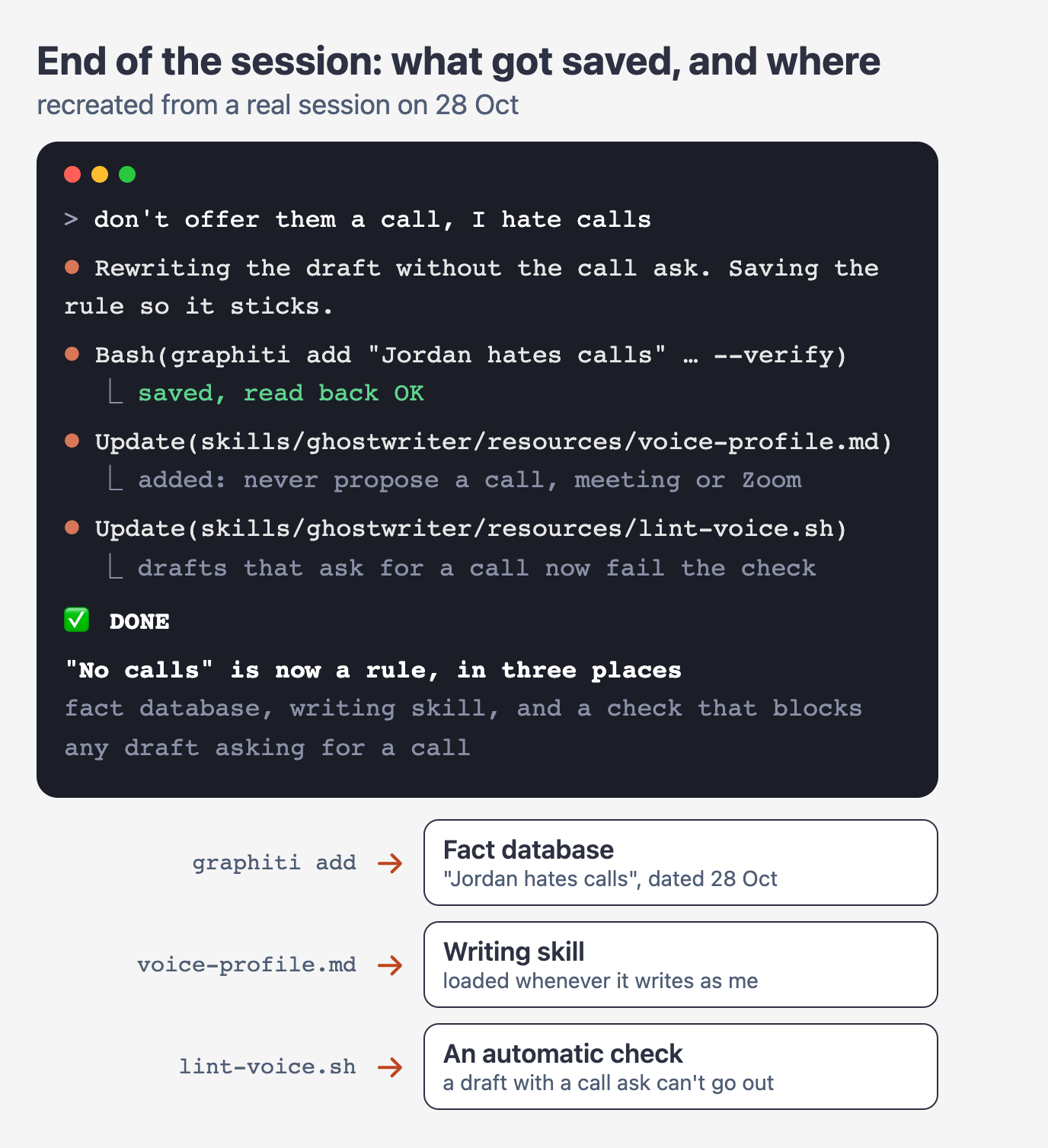
Reading is automatic, writing is the half people skip. My rules tell the agent to file what it learned before it wraps up, so when I correct it, the correction gets saved right there, in every place it belongs:
Where each thing goes follows a fixed order, and the first yes wins:
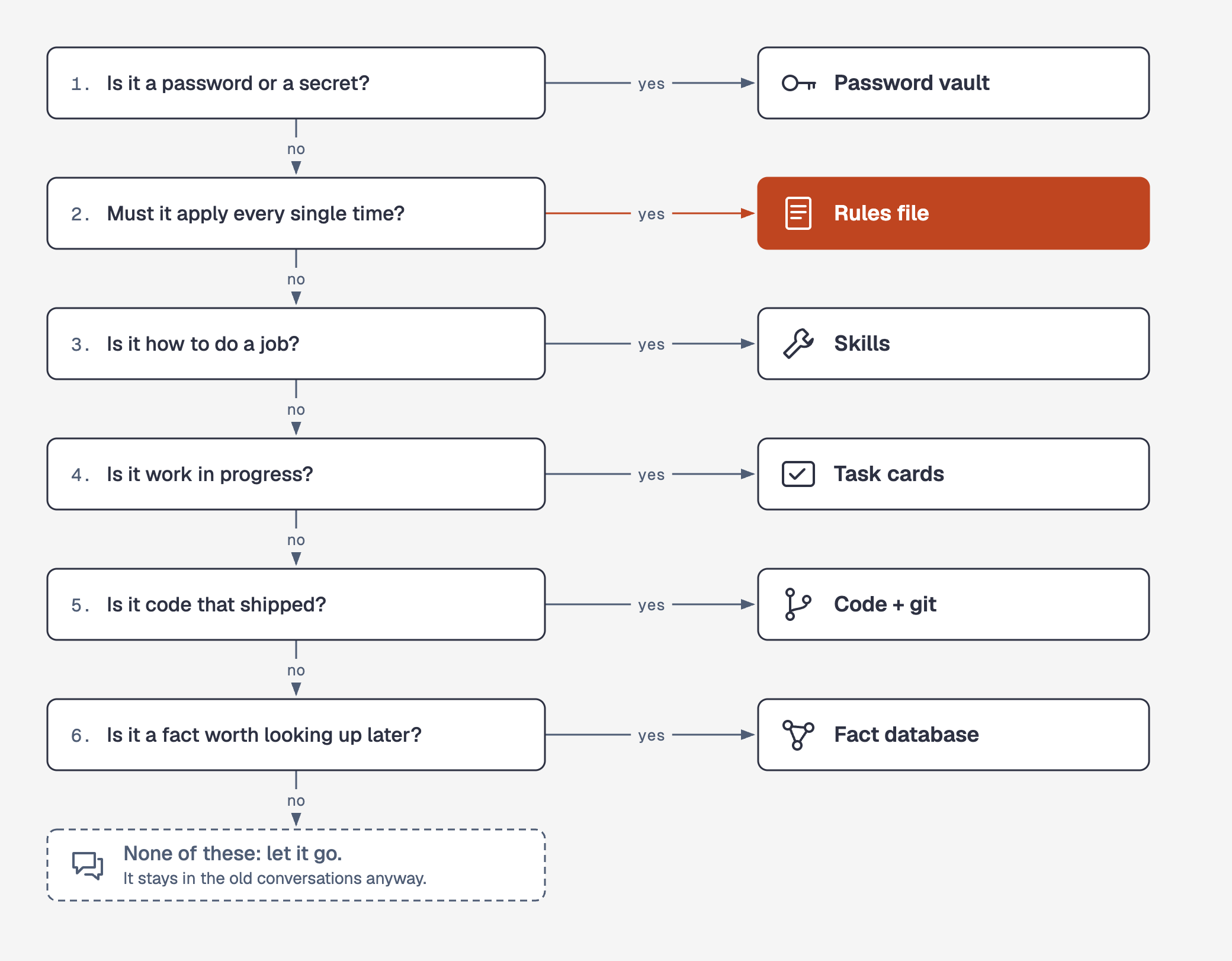
The default is to throw it away, because the old conversation is already saved anyway.
Where it still gets it wrong
Notes go stale. Today the automatic search pasted in facts about my photo server when I asked about a blog post, which is noise the agent has to ignore. And the plan file for this blog series said my last big post was an unpublished draft, five days after it went live. For “what’s true right now”, the agent has to check the real thing.
Start with one rules file
You don’t need all of this. Make one instructions file with the five things you’re sick of repeating. Put your passwords in a password manager your agent can read. Put work in progress on cards instead of in the chat.
And add “no em dashes”. Then make something check it.