
Your AI agent forgets everything. Skills fix that.
Every session your AI agent starts from zero. A skill is a runbook it reads on its own, so a lesson is learned once.

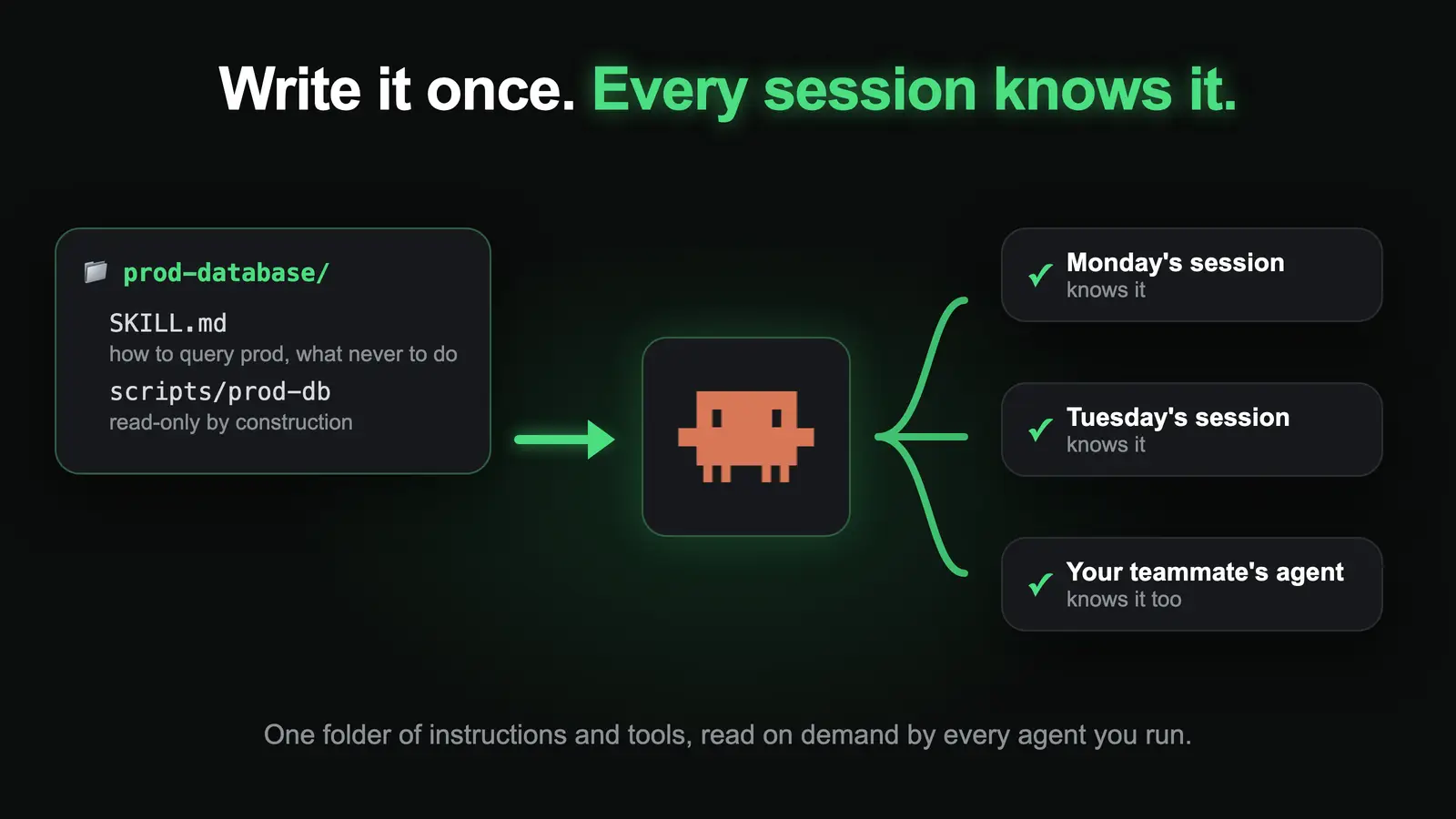
Every new session, your AI agent is a brilliant new hire on day one. It doesn’t know your database, your conventions, or the mistake you lost an afternoon to last month. Mine can query my company’s production database and can’t change a single row. It knows never to join the email table on a lowercased address, because that query once ran for two minutes before it got killed. I never explain any of that again, because it lives in a skill. Everything here runs on Claude Code with Opus 5.5.
🤖 Want your agent to set this up for you? Copy the prompt and paste it into your AI agent.
Prompt for your AI agent▾
I want you to stop forgetting how we do things. Set up skills for this project: a folder per skill with a SKILL.md (a one-line description written in the words I actually use, then the steps) and any scripts it needs.

Start with the three things I've had to explain to you more than once. From now on, when I correct you, put the correction in the skill file, not just in the chat.

How I do it, including a read-only production database skill:

https://strangenewworld.net/your-ai-agent-forgets-everything-skills-fix-that/

Read that page first, then propose the first three skills.
⚙️ Requirements
- 🤖 An AI agent that loads skills from a folder
Example: Claude Code - 🗂️ A git repo for the skills folder
So every change is reviewable and the whole team gets it
The model forgets, and the apps only half remember
The language model under ChatGPT or Claude has no memory at all. Every request starts blank, and the only thing it knows about you is whatever gets sent along with your message.
The apps paper over that. ChatGPT saves facts about you and can draw on your past chats. Claude has a memory setting that builds on past chats and can search them when you ask. Claude Code, the coding agent, reads a hand-written instructions file called CLAUDE.md at the start of every session and can keep notes of its own.
That’s fine for preferences like “use metric”. It doesn’t hold a procedure. App memory is a few sentences the app decides to bring back: nobody reviews them, your teammate doesn’t get them, and they can’t carry a script. So people still do one of two things: paste the same wall of context into every chat, or put up with the agent making the same mistake again.
Both get worse with a team. Five people means five slightly different pasted prompts, and the agent is only as good as whoever wrote the one it got today.
A skill is a runbook plus a tool
A skill is a folder. Inside is a short instructions file called SKILL.md, plus any scripts the agent needs to do the job. Skills are a built-in Claude Code feature, so none of this is a hack. What I’m sharing is how I use them.
The part that makes it scale: at startup the agent only sees each skill’s one-line description. It reads the full instructions when a task matches. So 400 skills cost about as much as 400 lines, not 400 manuals.
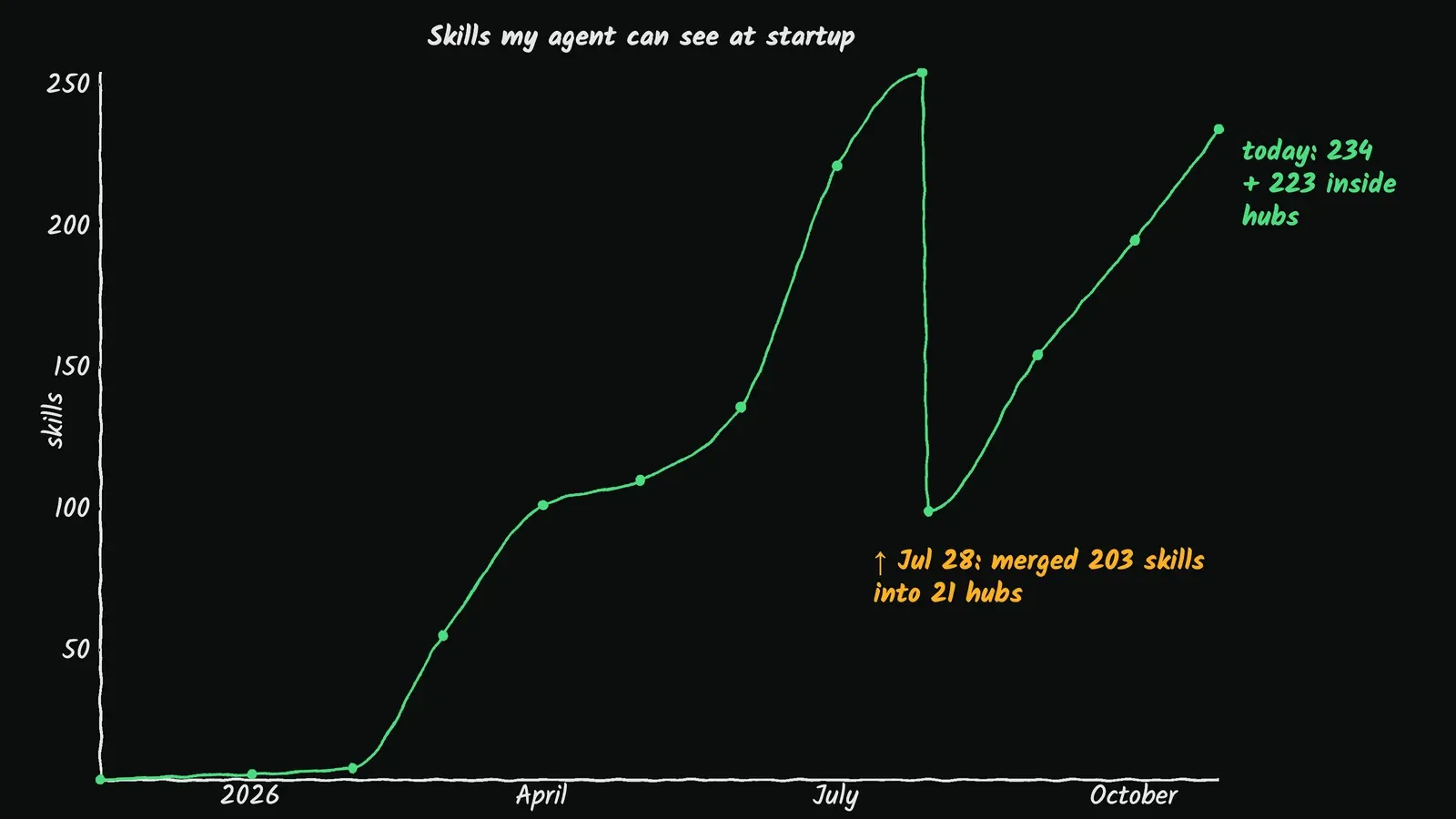
I started with 4 skills in November 2025. I have about 460 now, and you can browse them all on my skills page.
Give your agent the production database, safely
The skill a business will care about most is the one that answers “how many people signed up this week?” without an engineer.
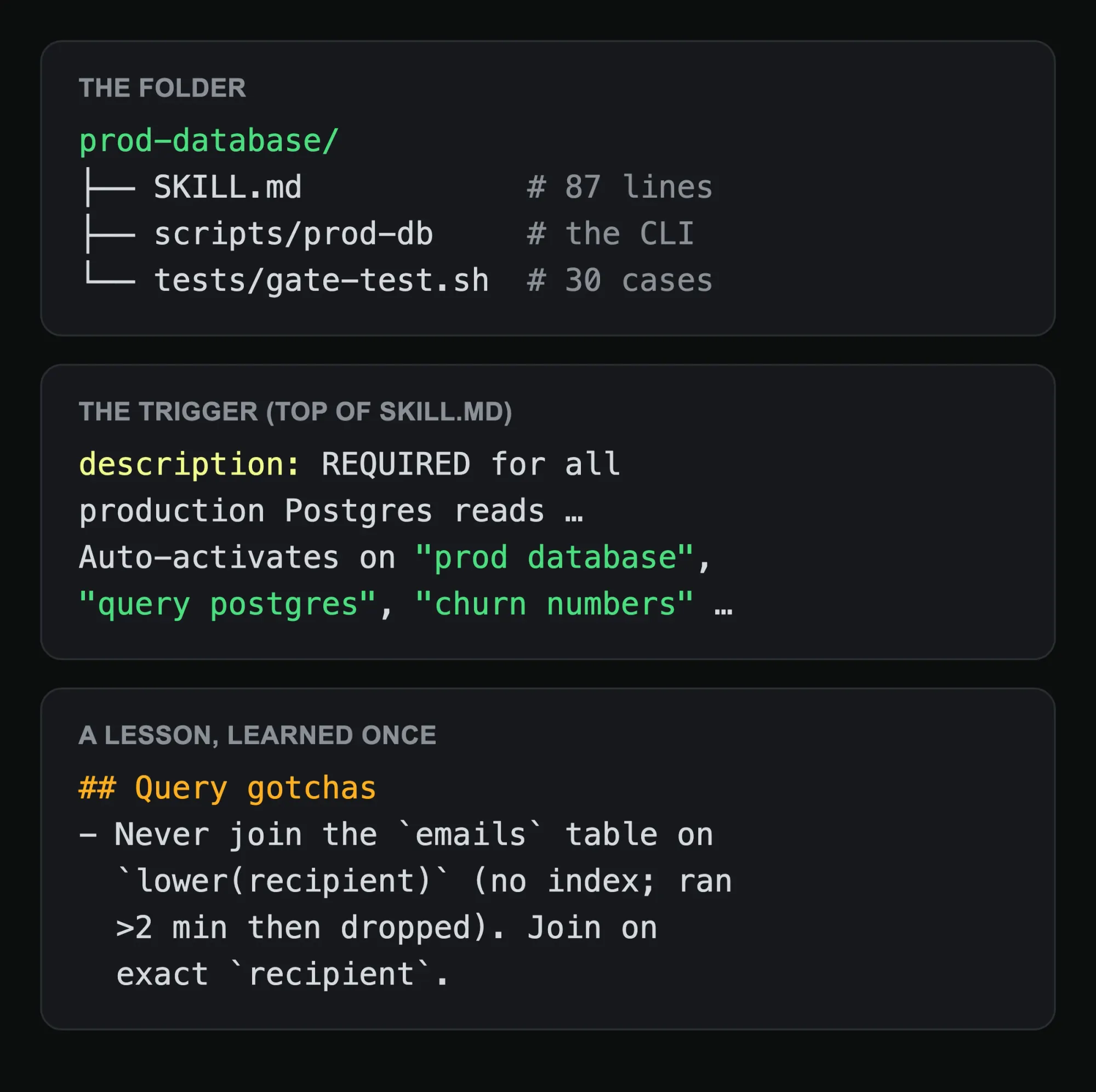
It’s 87 lines of instructions and one command-line tool. The agent writes plain SQL against production. I use it every day: agents pull numbers for me, and they investigate customer support tickets against the real data without being able to touch it.
The safety lives in the tool, not in the instructions. Writes are blocked three separate ways:

That’s why the agent can run it without asking me every time. An instruction that says “please don’t write to prod” is a hope. A tool that can’t write is a guarantee, and a test file with 30 cases checks it stays that way.
Corrections go in the skill, not the chat
The bottom of that file is a list called “Query gotchas”. Each line is something the agent got wrong once: the slow join, an email subject that also matched removal notices and double-counted invites, which column actually links two tables. Every one cost real time to figure out. None of them will cost it again.
That’s the habit that makes skills compound. When I correct the agent, the correction goes into the skill file, not into the chat where it dies with the session. The rule in my agent’s own instruction file:
A throwaway probe is fine; anything you’d run twice gets saved into a skill.
Write the description the way people actually ask
The description is how the agent decides to open a skill, so write it in the words people use. Mine lists “prod database”, “query postgres” and “churn numbers”. Nobody asks for “the Postgres read-replica access procedure”. They ask how many users there are.
If a skill never gets used, the description is usually the problem.
When you have too many, group them
By late July I had 254 skills, and the agent was reading a 279-line list of descriptions at the start of every session. Most of them rarely got used.
So on July 28 I had the agent merge 203 rarely used skills into 21 hubs. A hub is one skill whose description covers a whole area (all my blog tooling, say) and whose file is just a table pointing to the real skills inside it. The startup list went from 279 entries to 97, about 19,000 fewer tokens in every session, and nothing got deleted.
Make it a team asset
My skills folder is a git repo. Every edit is a commit, so I can see when a rule appeared and why.
For a team that’s the real win. One person’s fix becomes everyone’s default the moment it’s merged. A skill is onboarding you can review in a pull request, and it doesn’t quit.
Your first three skills, this week
- Write down the three things you explained to your AI agent more than once this week.
- Make each one a folder with a
SKILL.md: one line on when to use it, then the steps. - Every time the agent gets one wrong, fix the file, not the chat.
Start with the boring ones. Your deploy steps, your ticket template, your database. That’s where the time goes.
What I learned
- A prompt is spent when you send it. A skill is written once and every session after inherits it.
- Put the safety in the tool. Instructions get ignored; a read-only database user doesn’t.
- The description is the trigger. Write it in your users’ words.
- Past a couple hundred skills, group them, or the startup list eats your context.
I also have my agent playtest my games, act as my YouTube client, and end every turn with a five-second report. All of it runs on skills, and the full list is here. Subscribe to get the next one.